Veröffentlicht in Exchange

Exchange 2010 management console: “An error caused a change in the current set of domain controllers…”

While using the Exchange 2010 Management Console and navigating to the recipient mailbox, I received:

An error caused a change in the current set of domain controllers. It was running the command ‘Get-Recipient -PropertySet ConsoleLargeSet -resultSize ’1000′ -SortBy DisplayName -RecipientType ‘UserMailbox”.
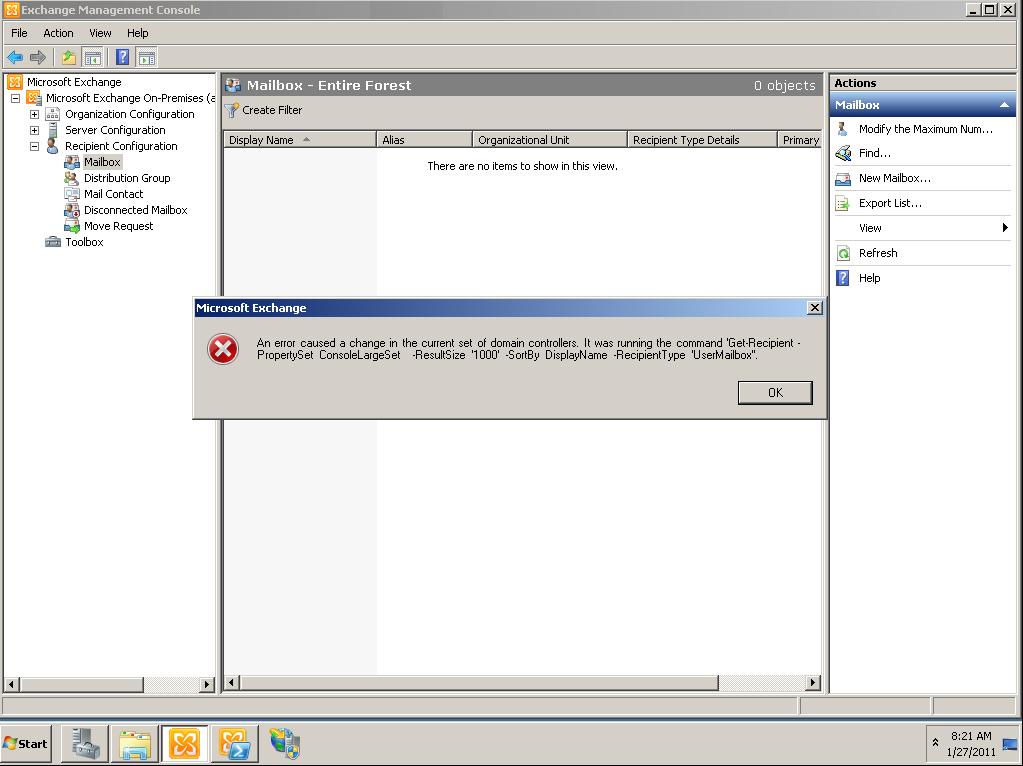
get-recipienterror

This  error started to occur shortly after the decommission of our old primary domain controller.

To fix this error, close the EMC and delete the xml file:

“C:\Users\username\AppData\Roaming\Microsoft\MMC\Exchange Management Console”
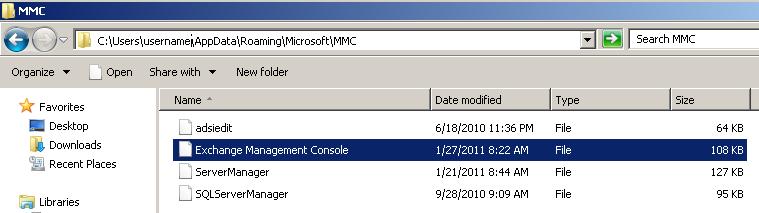
mmcfile

Quelle: http://d1it.wordpress.com/2011/01/27/exchange-2010-management-console-an-error-caused-a-change-in-the-current-set-of-domain-controllers/
 

Veröffentlicht in Windows 7, Windows 8

Startordner für Explorer ändern

In der Taskleiste findet man standardmäßig ein Icon für den Explorer. Ein klick darauf öffnet immer die
Bibliotheken des angemeldeten Benutzers.
Man kann mit einem einfachen Trick das Icon so umbauen, dass immer „Computer“ (früher Arbeitsplatz) geöffnet wird.

Hierzu einfach klick mit rechter Maustaste auf das Explorer Icon und wiederum rechte Maustaste auf Windows-Explorer und dann Eigenschaften wählen.

Hier im Feld Ziel einfach

%windir%\explorer.exe /e,

eintragen. FERTIG!